electronic surveillance chennai, extreme cctv cameras chennai, fake cctv camera chennai, fake cctv cameras chennai, home cctv chennai, home security camera chennai, home security camera system chennai, home surveillance chennai, honeywell security cctv chennai, infrared cctv cameras chennai. best cctv chennai, bosch cctv chennai, bracket camera cctv, business cctv chennai, buy cctv, buy cctv camera chennai, cameras cctv chennai, camera accessories chennai, camera cctv camera chennai, camera equipment chennai, camera sale chennai, camera sales chennai, camera system chennai, camera systems chennai, cctv, cctv & dvr chennai, cctv accessories chennai, cctv and dvr chennai CCTV Security Solutions Provider Chennai India. CCTV Consult Contact Us Chennai India. CCTV Camera System Integrator Chennai India. Closed-Circuit Television-CCTV Terms Chennai India. CCTV Consult Sitemap  Chennai India.
CCTV Network Camera
multimode cctv chennai, outdoor camera chennai, outdoor cctv chennai, outdoor security cameras chennai, panasonic cctv chennai, panasonic cctv camera chennai, panasonic cctv cameras chennai, pc cctv chennai, pelco cctv chennai, remote cctv chennai, remote cctv monitoring systems chennai.
 
  CCTV IP Camera
 
1.Decide on the objective of your CCTV system 2.Select your camera(s) 3.Select your control/recording equipment
4.Using PC Based Software 5.Select your monitor 6.Select the right accessories

Using IP Software
All-in-one solution
  • Record multiple cameras
  • Monitor cameras live
  • Playback footage easily
  • Use an existing PC or laptop to record footage
  • Excellent functionality
No. of cameras in network
No. of cameras to be recorded using software___CCTV IP Camera Setup

IP Camera set-up

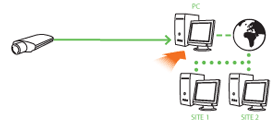
When using IP cameras, control software needs to be installed onto your PC which allows you to use differentcameras.
Note: See DVR set-up to find out more about the factors which will affect recording times. The same principles of recording CCTV footage will apply when using IP cameras.

Select your monitor
a. Television b. CCTV Monitor c. PC LCD Monitor

Television monitor
A single camera can be connected to the RCA or Scart connectors on your Television.
Multiple cameras can be connected to a TV via a Switcher, Quad Processor, Multiplexer or DVR by using a
BNC to Scart Convertor.

CCTV Television Monitor

If the monitor is always on it is recomended to use a CCTV Monitor (CRD or LCD), as the screen are designed to last longer with reduced boom out.


PC LCD monitor
If the DVR has a VGA output, then it can be directly connected
to a PC Monitor.
If no VGA output is available from the
DVR then a BNC to VGA Convertor
is required. See diagram.

CCTV PC LCD Monitor

Ask yourself:
1. What size screen do you require?
2. What resolution does the screen need to be?
3. What inputs will be required from the recording device or camera(s)? (ie. BNC, VGA, Scart etc)
4. Will you require any additional devices/connections for viewing your cameras on the monitor?
(ie. BNC to Scart lead etc)
 
  Copyright 2009 © ATSS Chennai India. www.atss.in | www.videosurveillance.co.in | www.burglaralarm.in | www.accesscontrolsystem.in