Select the Right CCTV Accessories
1. Cabling for System
Wireless System (2.4 GHz) Only required power cabling
Wired:
Cabling Distance
Cameras to control recording equipment___
Control/recording equipment to monitor___
Wireless systems require no cabling to transmit the video signal. (The cameras must be powered)
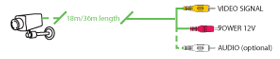
RG59 cabling is professional standard cable and can be bought in 100m reels which will need to be ‘crimped’ with BNC connectors. RG59 shotgun cable also includes the power cable.
Cat 5/LAN Cable is used for IP network camera connection.
2. Power Supplies
Ask yourself:
Is it possible to run/extend each camera’s power cable back to its own mains power supply?
Note:
Wireless cameras must be powered locally
3. Brackets
Alternative required?
Cameras are supplied with a standard bracket
Housing required?
For outdoor use
Warning Signs
Quantity required___
Under the Data Protection Act, warning signs should be displayed in public places.
Dummy Cameras
Standard version
Dome version
External version
Dummy cameras are often a low cost method of providing a further deterrent.
For more information about selecting the right CCTV system for you, contact our team at ATSS on 9150012345 or Email us info@atss.in